 Farlink
Your Mac's files.
From anywhere.
Open them on iPhone, iPad or another Mac. Not only on the same Wi-Fi. No cloud upload. No VPN, port forwarding or server to set up.
Free for up to five of your own devices · Your Mac must be on and connected to the internet.
Open files from anywhere.
Reach your Mac over the internet, not only your Wi-Fi. Download only what you open, not your whole drive.
- Connect your devicesScan a QR code or enter a code. Confirm the same six numbers on both screens. No server to set up.
- Share selected foldersChoose folders on your Mac. Decide who can read or change them. Your other folders stay private.
- Open files from anywhereFarlink connects directly when possible. Otherwise, its servers forward the encrypted data. Open shared folders in Finder or the Files app.
Open files. Send files. Chat.
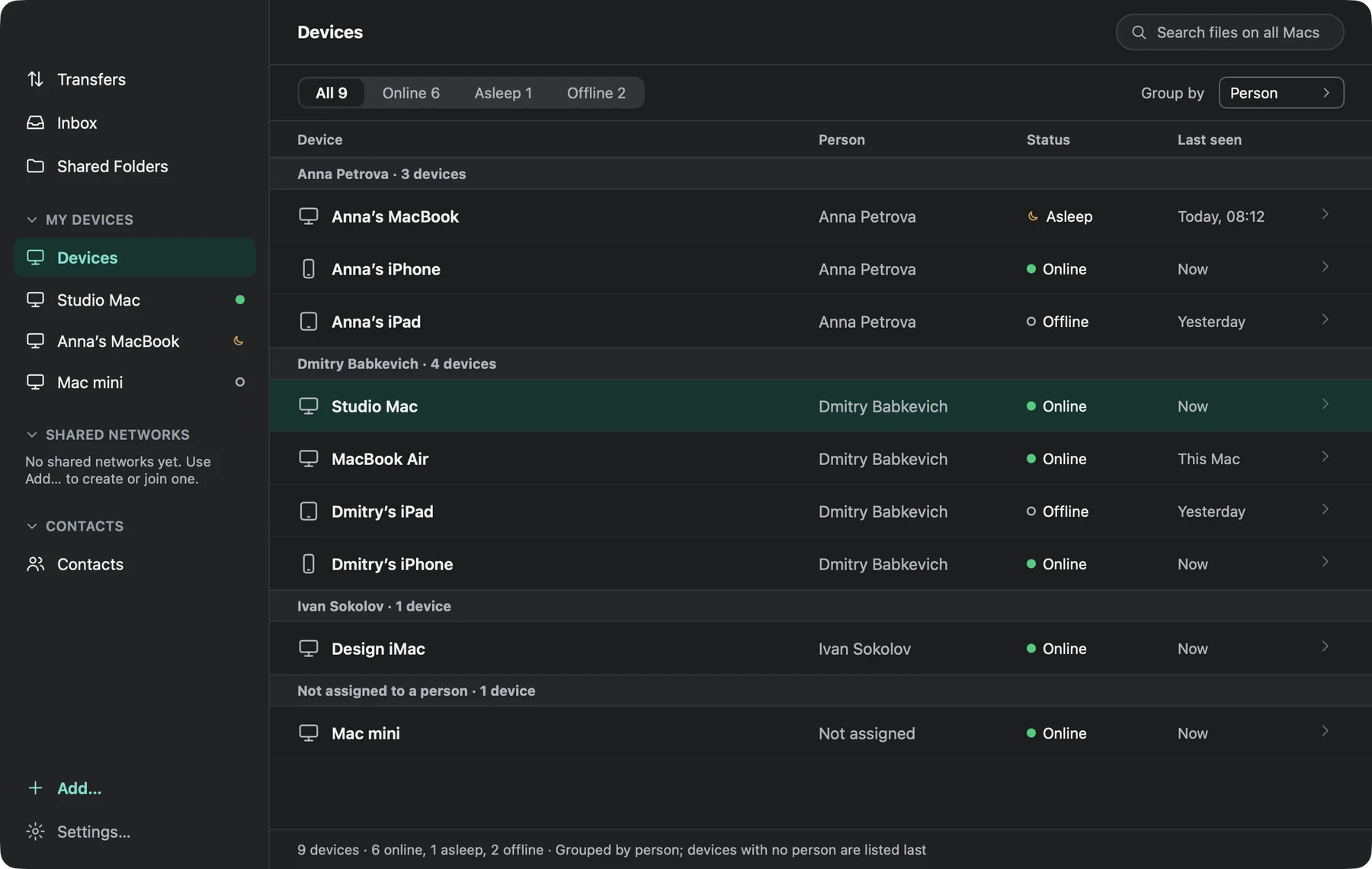
Open files on your other Macs
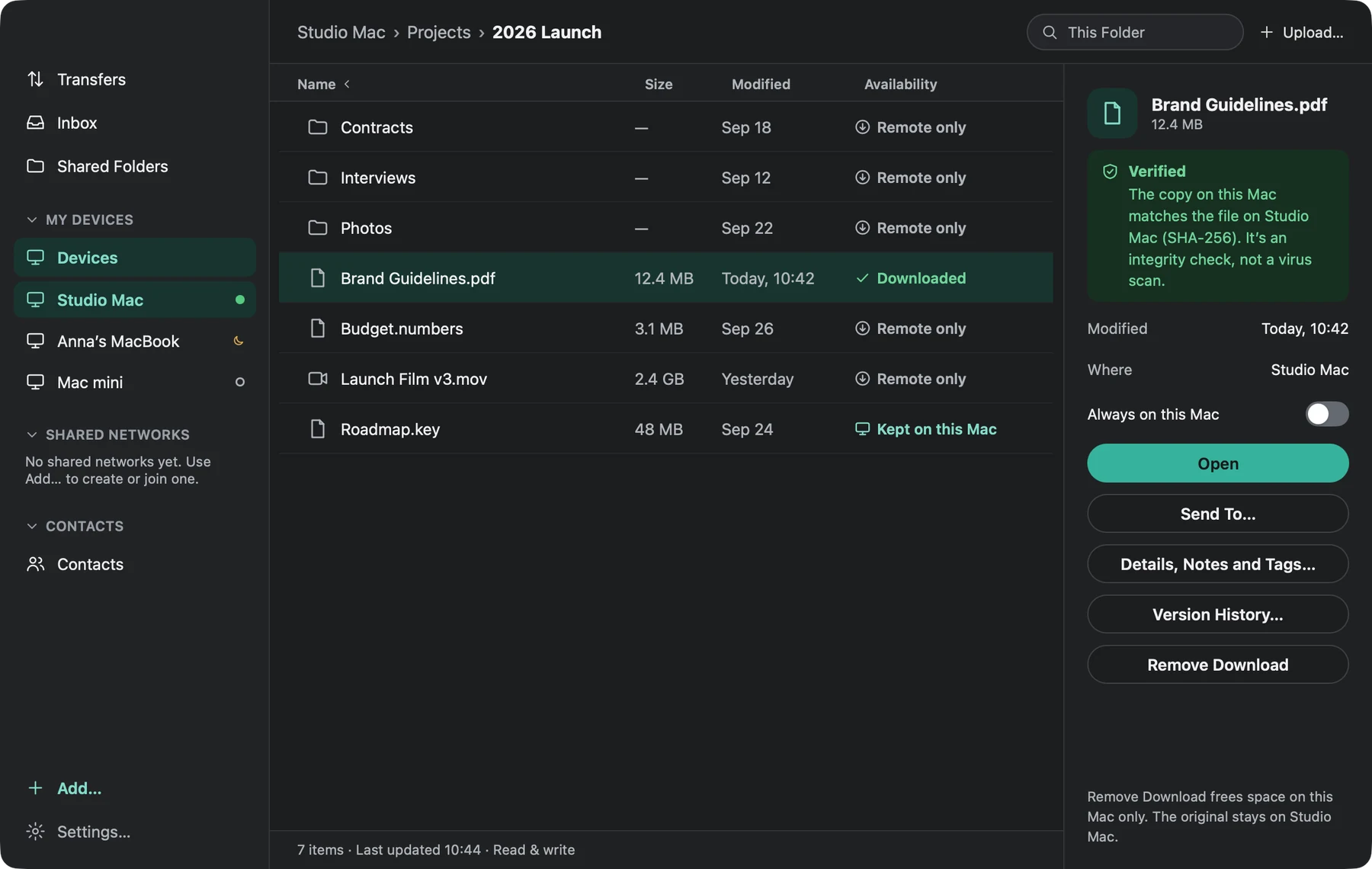
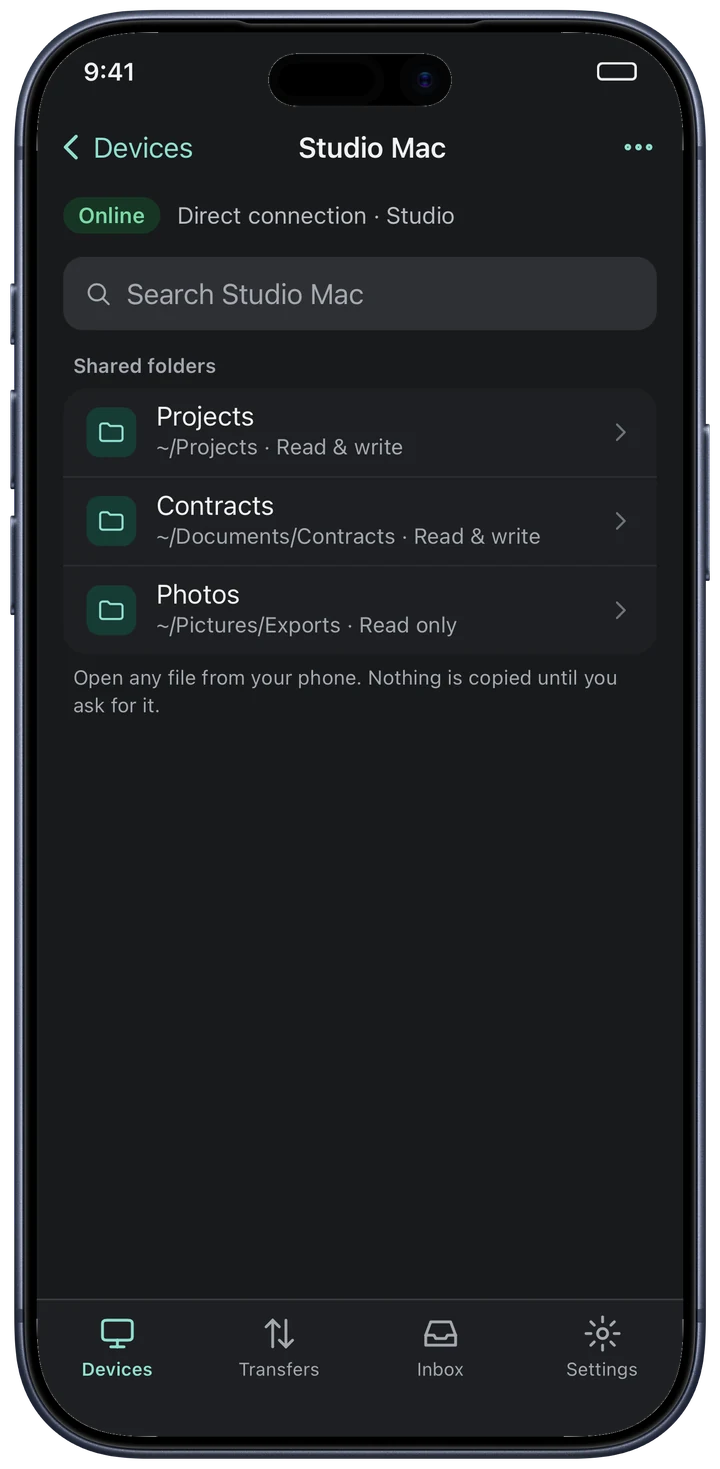
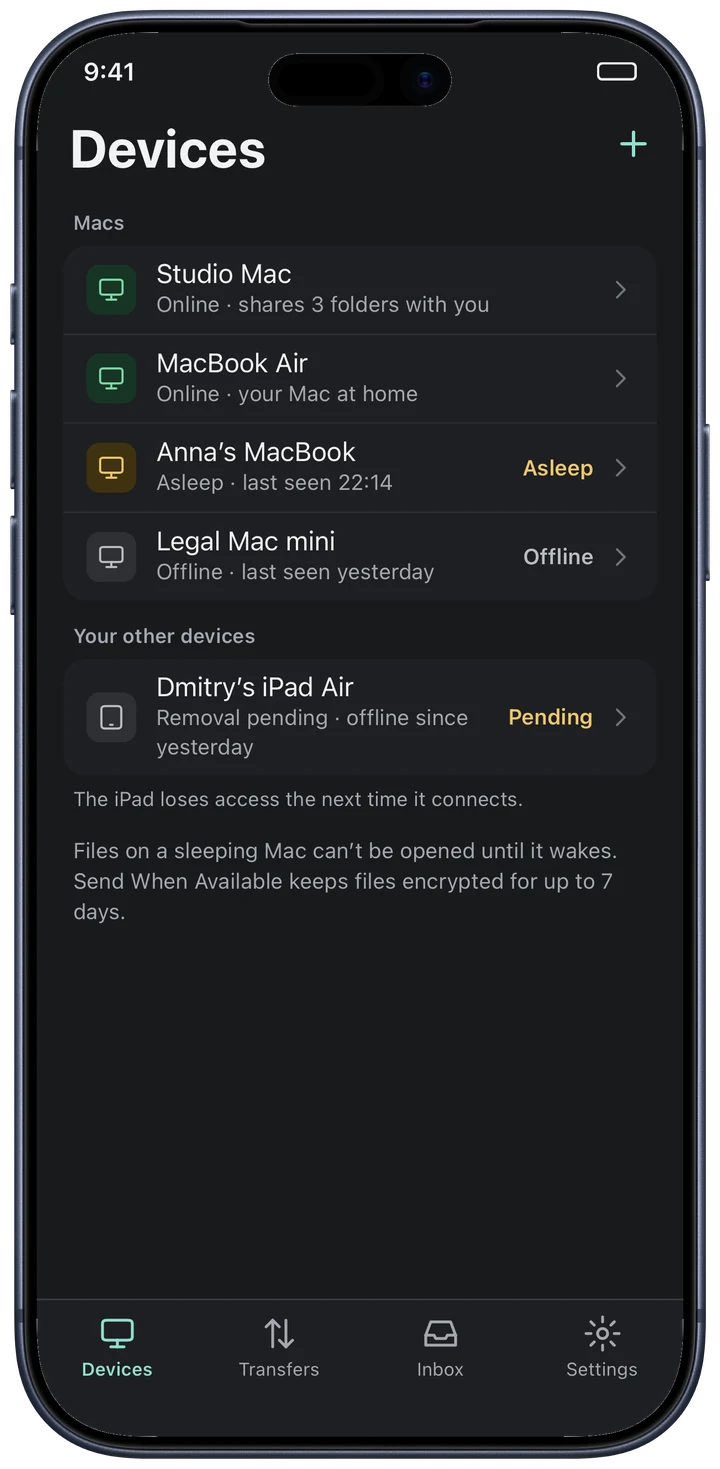
Find the folders you share from a Mac on your iPhone, iPad and other Macs. Open them in Farlink, Finder or the Files app.
- Use Finder and the Files app to browse, download and upload files on your Macs
- Choose “always on this device” for folders you need offline
- Add notes and tags, and lock a file while you edit it
- Preview PDFs, photos and video without downloading the whole file Pro
- Wake a sleeping Mac through another Mac on its network Pro
Send files to your devices or contacts
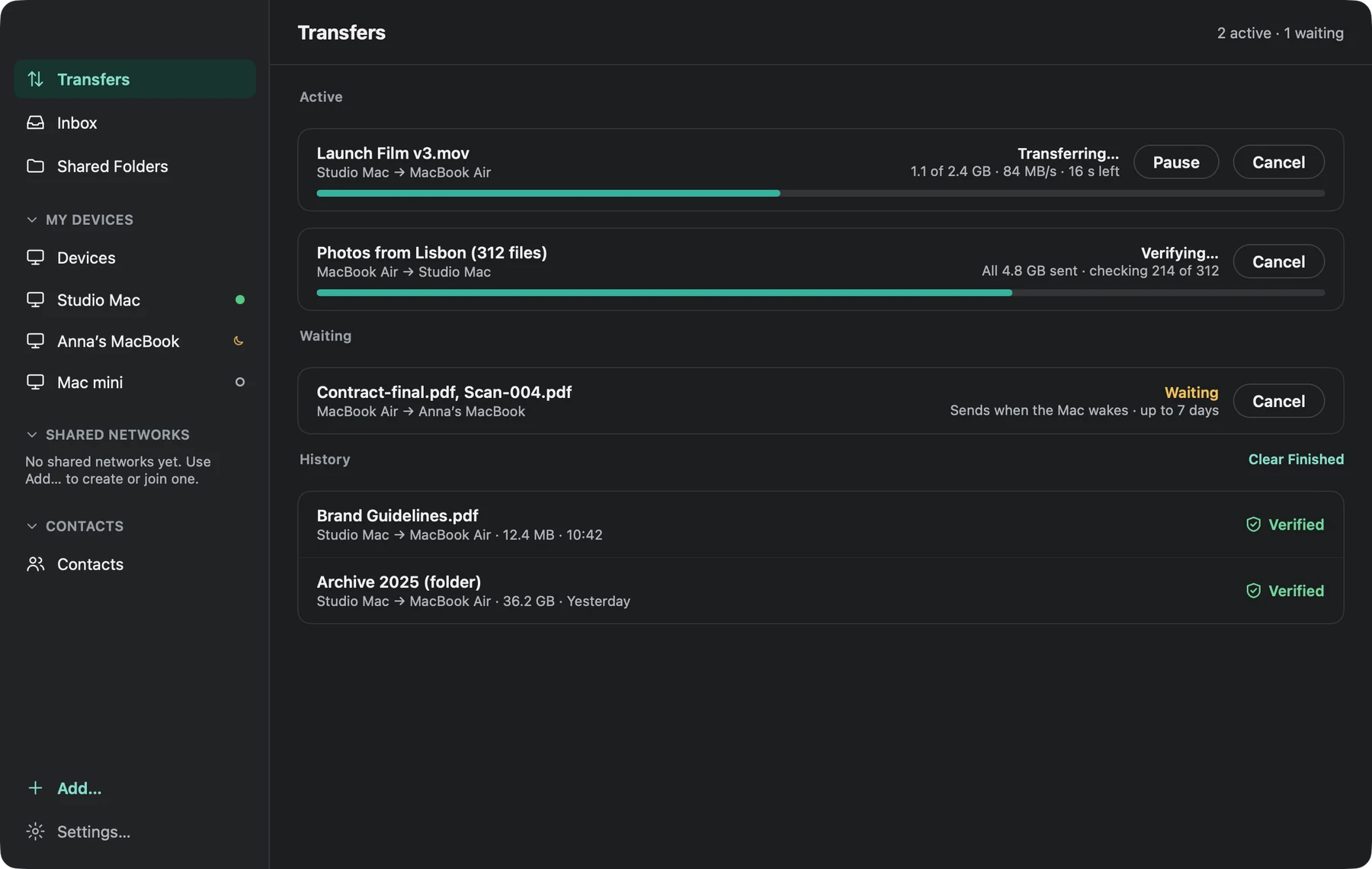
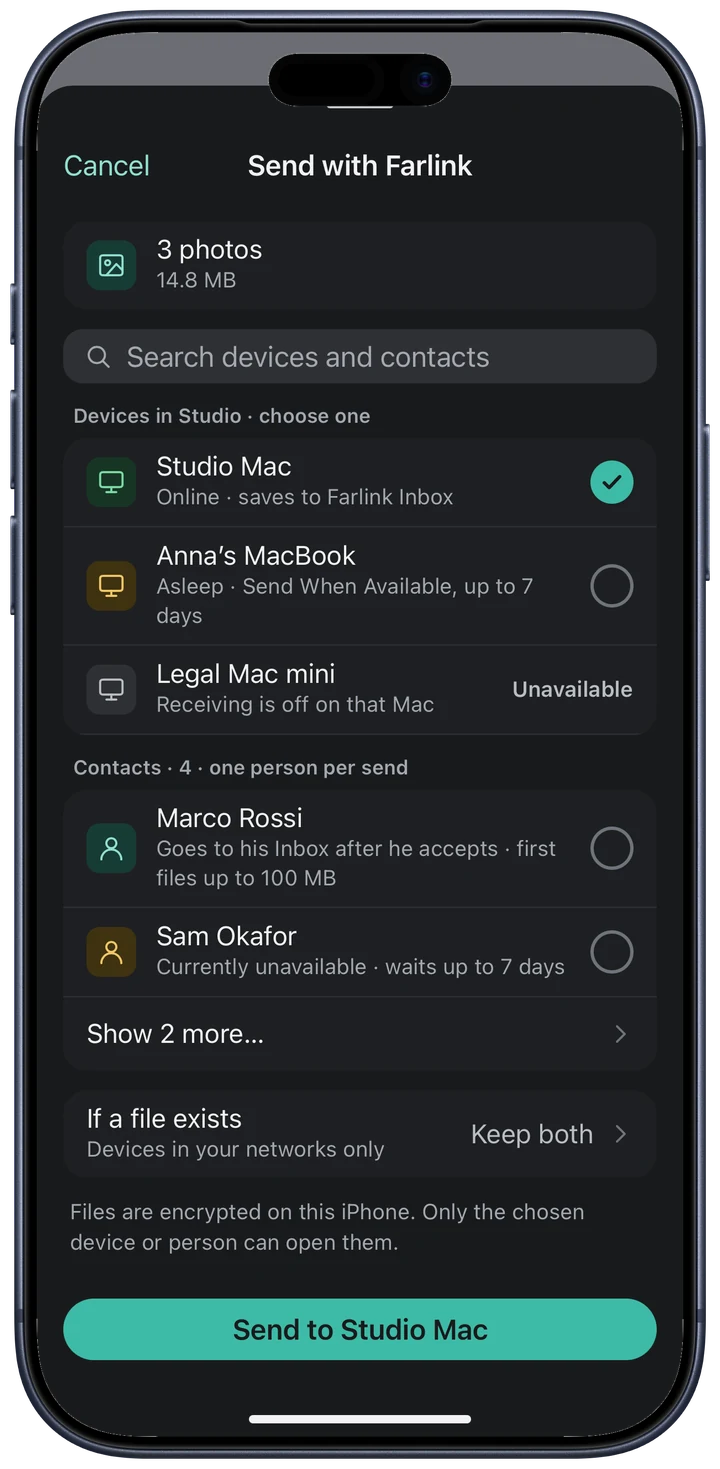
Drag photos, folders or large files into Farlink. Choose a device or contact and send. If the receiving device is asleep, the files wait encrypted for up to 7 days. Farlink delivers them when the device comes online during that time.
- Farlink checks every file against the original
- Pause, resume or cancel any time
- Transfers resume after a lost connection
- Send from the Share sheet on iPhone and iPad
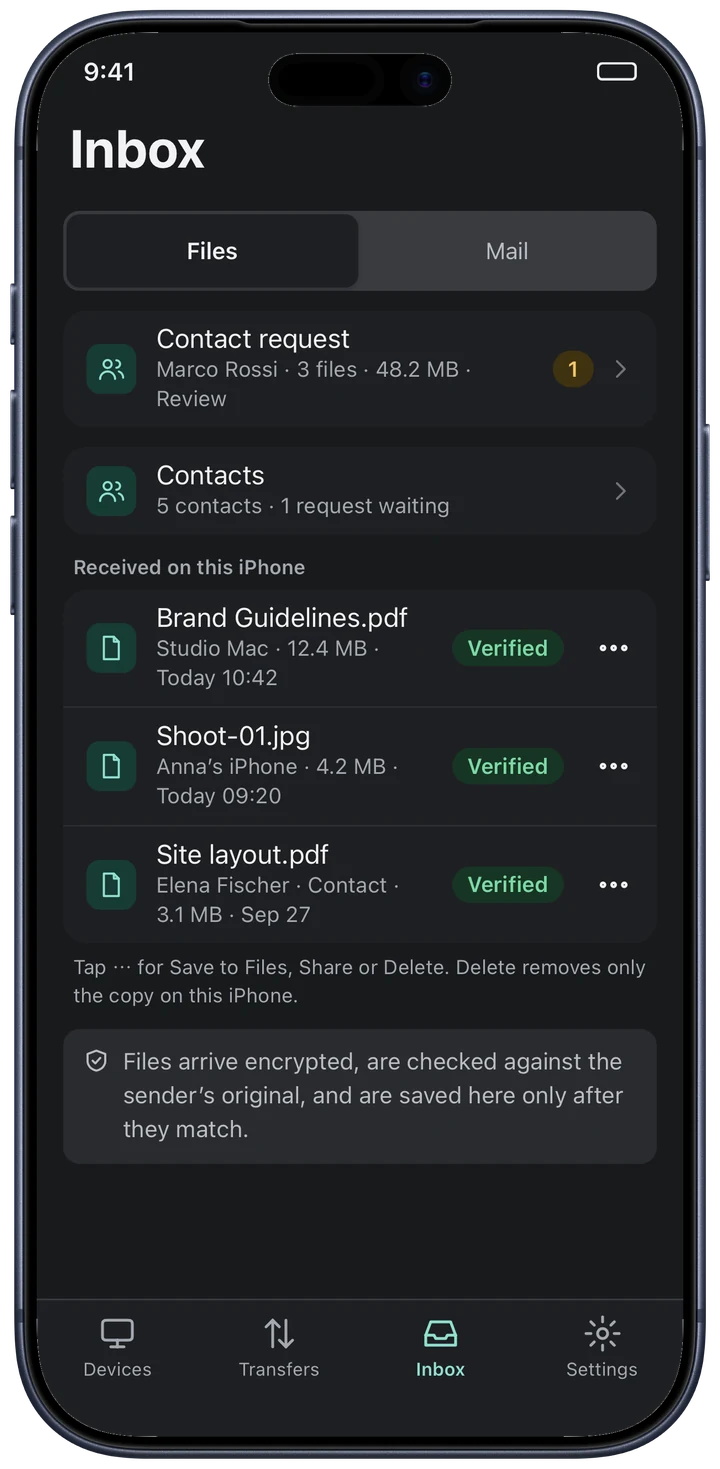
Received files
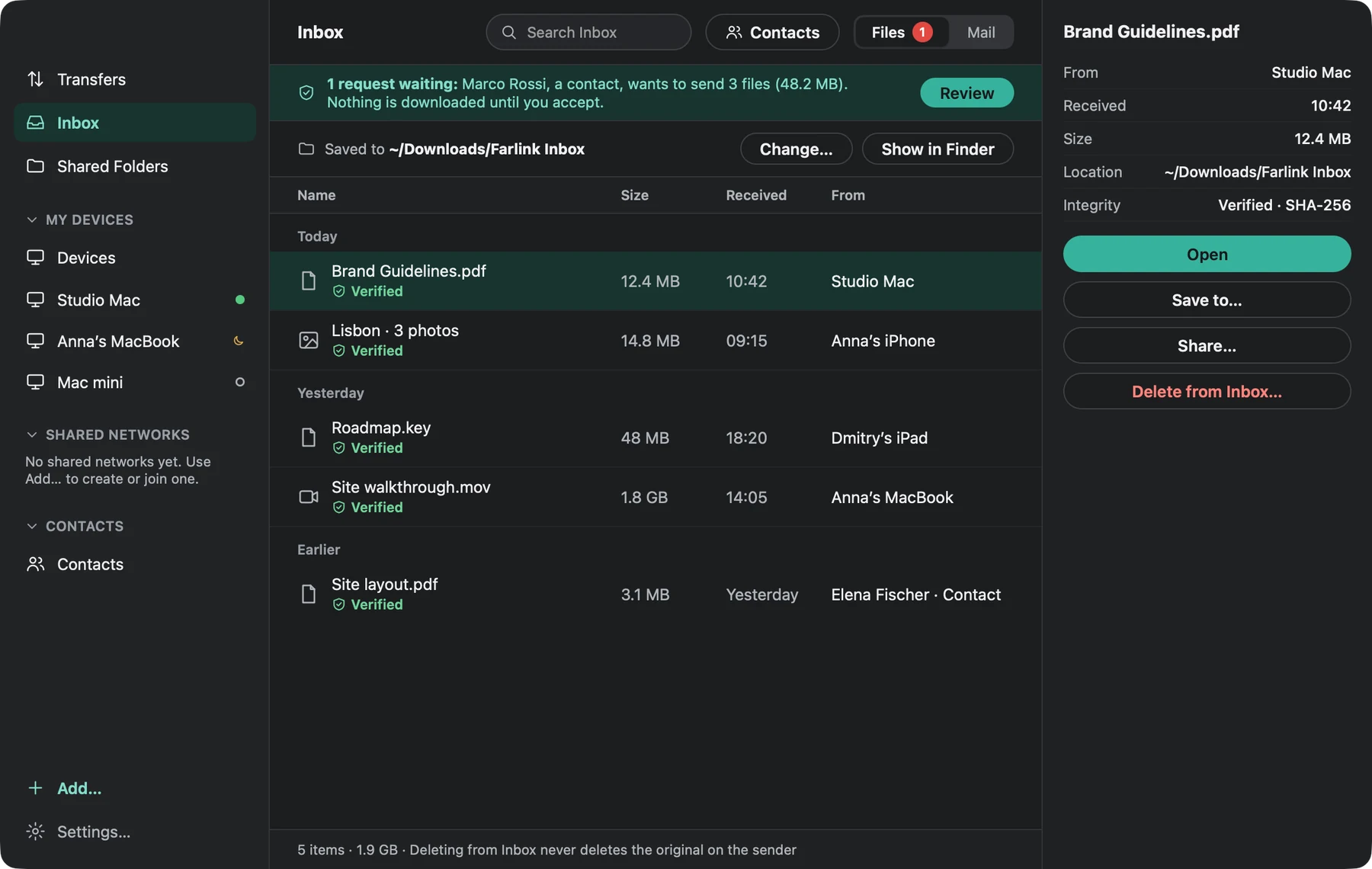
See who sent each file, whether it matches the original and where Farlink saved it. When someone new sends you a message, you choose whether to accept it. Farlink does not download attachments until you accept.
- See whether each file passed the check
- Choose where Farlink saves received files
- Read Mail from members of your shared networks
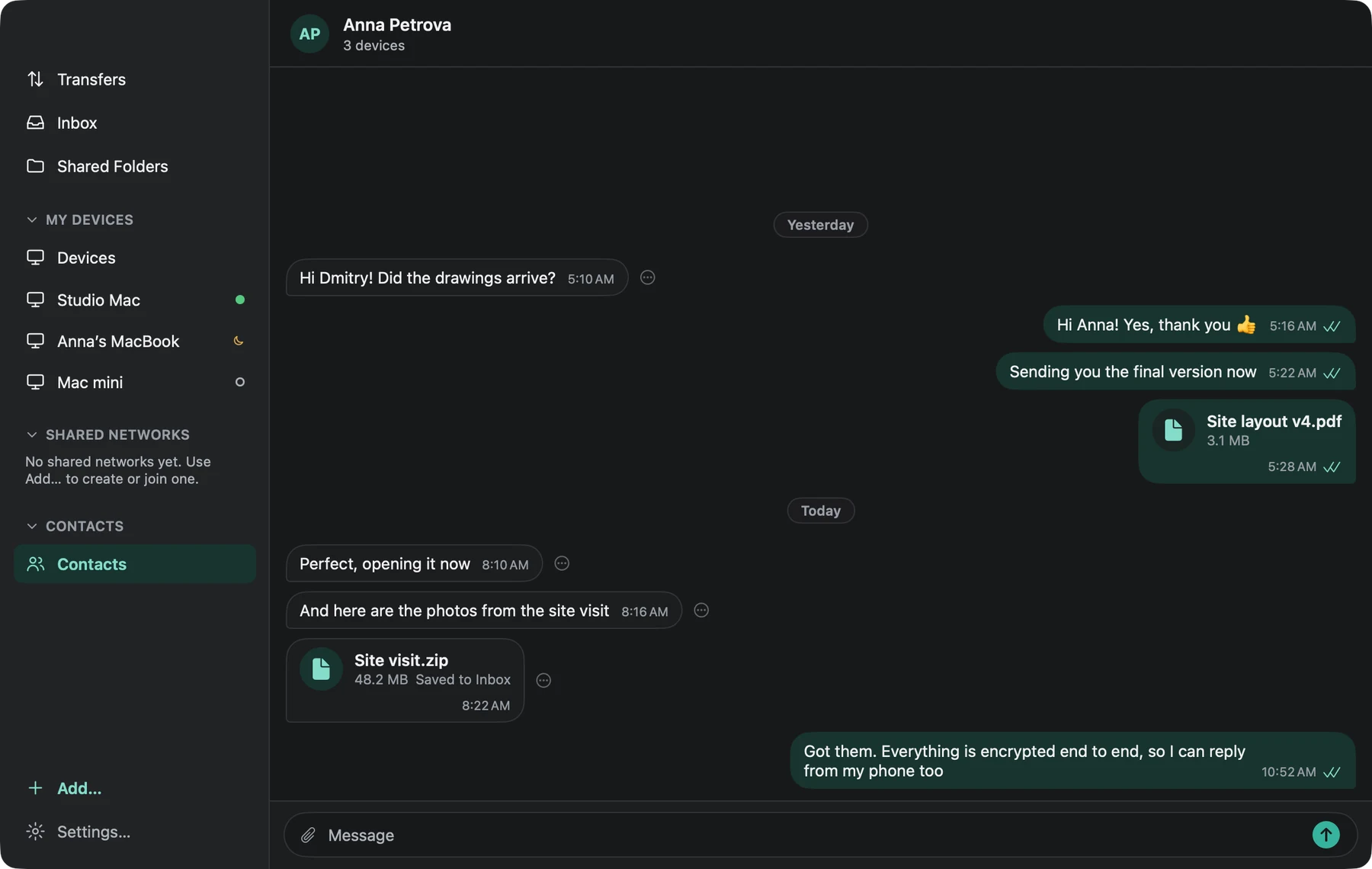
Messages with your contacts
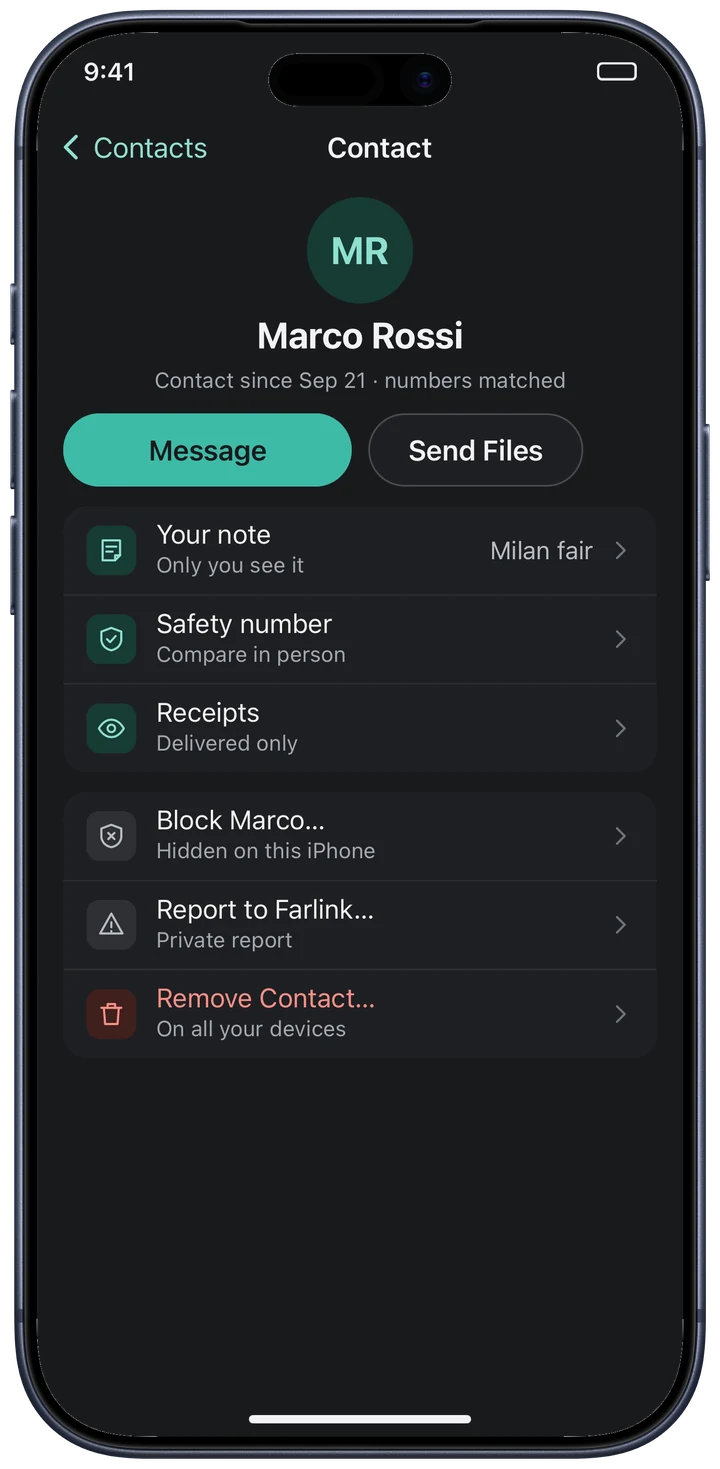
Add a contact with a one-time code. Check that you both see the same six numbers. Farlink does not need your phone number or address book. Then send messages and files in the chat.
- End-to-end encrypted messages with delivery ticks
- Send files in the chat. Farlink saves them to the Inbox after checking them
- Block or report a contact. Farlink applies the block on all your devices
Shared folders and teams
Create a network and invite people. For each folder, choose read only, read and write, upload only or no access. Free networks allow three people. Teams supports up to 50 people and adds groups, multiple admins and approval for sharing.
Photo albums Pro
Upload selected albums from your iPhone to a Mac in their original quality, including HEIC, RAW and Live Photos. Choose a folder and whether to upload only on Wi-Fi. Pause uploads at any time.
Search all your Macs Pro
Search all your Macs at once. Farlink labels results from a sleeping Mac and uses its last search index.
Version history
Restore an earlier version of a shared file you changed through Farlink. Farlink keeps every version for 24 hours, then the last version from each day for 30 days.
Mail for your shared networks
Send messages with attachments to members of your shared networks. Secret mail hides the text in the list and deletes the message after the recipient reads it. Or set it to expire after an hour, a day or a week.
Use Finder and the Files app
Open shared Mac folders in Finder on Mac and in the Files app on iPhone and iPad. Use the Share sheet to send files from other apps, or drop files on a device in Farlink.
Farlink checks received files
Farlink compares each received file with the sender’s original. It marks the file Verified if it matches, or explains why it did not pass the check.
Direct connections
When devices share a network or can connect directly, they transfer files without using Farlink servers. Direct transfers are fastest and cost nothing. Farlink uses its servers only when the devices cannot connect directly.
Encrypted before they leave.
Your files and messages are encrypted end to end on your device. Farlink's delivery servers cannot read them. No cloud copy of your files.
Encrypted on your device
Farlink encrypts file contents, file names, folder lists and messages end to end. Your private keys never leave your devices.
Servers deliver encrypted files
Farlink servers can see your IP address, public device keys, who sends to whom, file sizes and timing. They cannot read the files or messages they deliver.
Manage access to your account
Check the six numbers when you add a device. Tap to remove a device. Keep your recovery key. If you delete your account, your devices erase their Farlink data when they reconnect.
What servers can see
- Your IP address and when a device is online
- Public keys and the names you gave your devices
- Who sends to whom, how much data they send and when
What servers cannot see
- File names, folders and contents
- Your messages and your contacts’ names
- Your private keys
Why do files wait for up to 7 days?
Your files stay on your devices. If the receiving device is asleep, Farlink keeps an encrypted copy for up to 7 days to deliver it, then removes it. This is temporary storage for delivery, not a backup. For details on what Farlink stores and for how long, read the Privacy Policy.
No cloud copy of your files
Open files you already keep on your own devices.
| Farlink | Cloud drives | AirDrop | Sync tools | VPN file shares | |
|---|---|---|---|---|---|
| Files stay on your own devices | Yes | Copy in the cloud | Yes | Yes | Yes |
| Works away from home, no setup | Yes | Yes | Nearby only | Needs setup | Needs setup |
| Open a single file without syncing everything | Yes | Yes | No | No | Yes |
| End-to-end encrypted by default | Yes | Usually not | Yes | Yes | Yes |
| Waits to deliver files when a device is offline | Up to 7 days | Yes | No | When both are online | No |
| Contacts and private chat | Built in | No | No | No | No |
| Native on Mac, iPhone and iPad | Yes | Yes | Yes | Mac only, iPhone limited | Varies |
This compares types of products as of 2026. Features vary, so check the product you plan to use.
Free for up to five of your own devices.
Most files transfer directly between your devices at no cost. Paid plans add devices, features and more data through Farlink servers.
Free
For your own devices.
- Up to 5 of your own devices
- Browse, download and send files
- Contacts, chat, Mail and Inbox
- Version history and offline folders
- 10 GB of relay traffic a month
Pro
For people who use several devices.
- Up to 15 of your own devices
- Photo albums
- Search all your Macs
- Preview files and video without downloading them in full
- Wake a sleeping Mac
- Choose folder access for each device
Relay
When your devices are rarely on the same network.
- 200 GB of relay traffic a month
- For your whole account
- Files can wait up to 7 days, up to 20 GB in total
Relay Max
For large files and frequent transfers.
- 2 TB of relay traffic a month
- For your whole account
- Files can wait up to 7 days, up to 20 GB in total
Teams
Invite people to a shared network. You pay for people, not devices. Teams gives members Pro while the subscription is active. It also adds a shared relay allowance, groups, roles and folder permissions.
| People | Shared relay allowance | Per month | Per year |
|---|---|---|---|
| 3 | 600 GB | $9.99 | $99.99 |
| 5 | 1 TB | $14.99 | $149.99 |
| 10 | 2 TB | $24.99 | $249.99 |
| 25 | 5 TB | $54.99 | $549.99 |
| 50 | 10 TB | $99.99 | $999.99 |
What is relay?
Your devices send files directly when they share a network or can connect to each other. Direct transfers are free and unlimited. If the devices cannot connect directly, Farlink forwards the encrypted data through its servers. This is relay traffic. For example, your Mac at home and your phone on mobile data may need relay. The free plan includes 10 GB a month. Relay and Relay Max add more for the whole account. Files you send to contacts always use relay because contacts do not connect directly to your devices.
Prices in US dollars, billed through the App Store, where you see the price for your country. Subscriptions renew automatically unless cancelled at least 24 hours before the period ends. Manage them in your Apple Account settings. Relay allowances reset every calendar month (UTC).
Common questions
Do I need an account or an email address?
You do not need an email address or phone number. Farlink creates your account on your device using cryptographic keys. Choose a name and keep your recovery key in case you lose all your devices.
What if my Mac is asleep or off?
With Pro, another Mac running Farlink on the same network can wake your sleeping Mac. Files you send to an offline device wait encrypted for up to 7 days. To open a file on a Mac that is off, turn the Mac on first. The file is on that Mac, not in the cloud.
Can Farlink read my files or messages?
Farlink encrypts files, file names, folder lists and messages on your device. Its delivery servers cannot read them. Farlink can read text you choose to send in an abuse report or support email. See the Privacy Policy for exactly what servers can see.
Which devices can I use?
Farlink works on Mac, iPhone and iPad with macOS, iOS or iPadOS 26. We plan to support more platforms.
Do I need my own server?
No. Farlink runs servers in the United States and Russia to forward encrypted data when devices cannot connect directly. You can also run your own server, completely separate from ours. Learn how.
What happens when I delete my account?
Your account data and queued items are removed from Farlink servers, and your devices erase their Farlink data when they next connect. Files already received by other people stay with them. Deleting the account does not cancel an App Store subscription: manage that in your Apple Account.
Why is there a subscription?
Farlink uses servers when devices cannot connect directly. Moving data through those servers costs money. Pro is a one-time purchase. Relay and Relay Max are subscriptions for extra relay traffic. You can choose one if you need more relay traffic.